
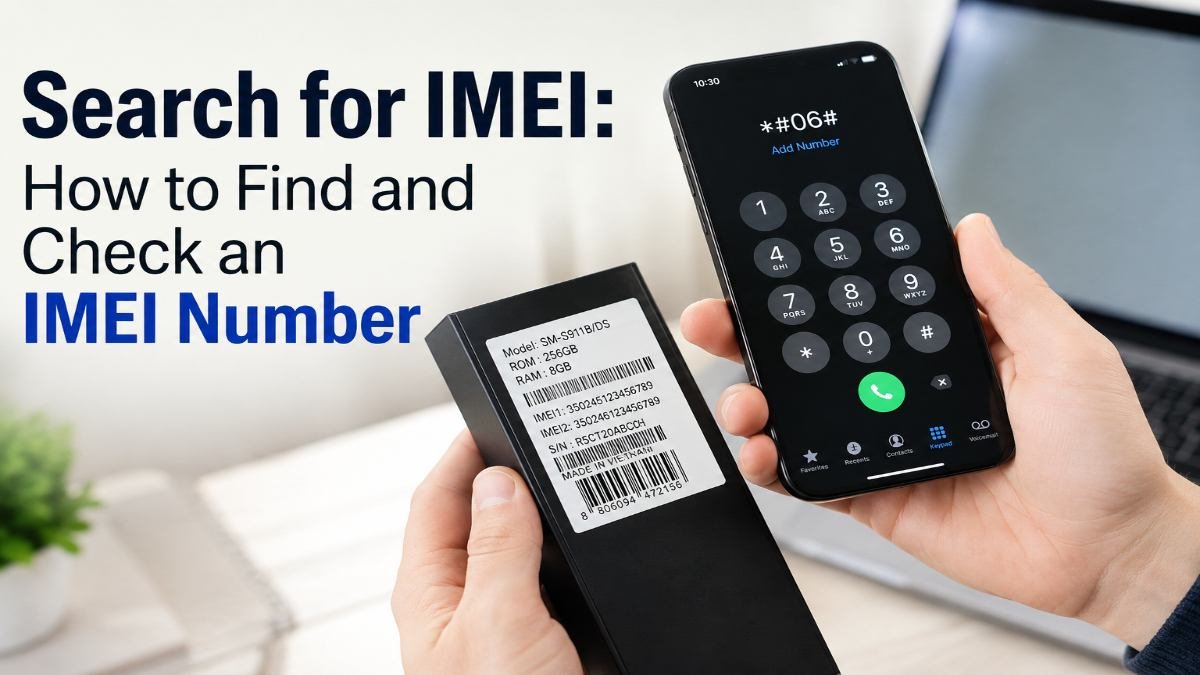
If you want to search for IMEI information, the first step is finding the phone’s IMEI number. An IMEI is a device identifier used by cellular-connected phones and other mobile devices. It can be useful when checking a used smartphone, identifying a device, or determining whether a phone has been reported lost or stolen.
For people in the United States buying a second-hand iPhone or Android phone, an IMEI check can be an important step before handing over money. The CTIA Stolen Phone Checker allows U.S. consumers to enter a device identifier and check whether the device has been reported lost or stolen.
This guide explains how to find an IMEI, how to search for IMEI information, what an IMEI check can tell you, and what it cannot tell you.
What Is an IMEI Number?
IMEI stands for International Mobile Equipment Identity.
It is a unique identifier associated with a cellular mobile device. The CTIA’s Stolen Phone Checker describes an IMEI as a 15-digit electronic identifier for a GSM device. Other device identifiers, including MEID and ESN, may be used with certain older technologies or devices.
An IMEI identifies the device, not the person using it.
That distinction is important. An IMEI is different from:
- Your phone number
- Your SIM card number
- Your Apple ID
- Your Google account
- Your device’s serial number
A phone can also have more than one IMEI when it supports multiple cellular connections, such as many dual-SIM smartphones.
What Does an IMEI Number Tell You?
An IMEI can be used as a device identifier when interacting with mobile networks and device-checking systems.
Depending on the service being used, an IMEI search may help you determine information such as:
- Whether the device identifier has a valid format
- The device associated with the identifier
- Whether the device has been reported lost or stolen in a particular database
- Whether the device may be blocked from cellular service
- Certain device information provided by a legitimate lookup service
However, an IMEI number is not a complete history report for a smartphone.
A basic IMEI lookup should not automatically be interpreted as proof that a phone is authentic, unlocked, fully paid off, or free from every possible restriction.
How to Find Your IMEI Number
Before you can search for IMEI information, you need the correct number.
There are several ways to find it.
1. Dial *#06#
One of the quickest methods is to open the phone’s dialer and enter:
*#06#
On supported cellular devices, the IMEI information should appear on the screen. CTIA lists this as one method for obtaining an IMEI, MEID, or ESN.
This method can be especially convenient when you are checking a phone in person.
2. Find the IMEI in iPhone Settings
On an iPhone, open:
Settings → General → About
Look for the IMEI field.
If the iPhone supports multiple cellular lines, you may see more than one IMEI.
When buying a used iPhone, compare the IMEI shown in the device with the identifier provided by the seller or printed on the original packaging when available.
3. Find the IMEI on Android
Android menus can vary between manufacturers and software versions, but the IMEI is generally available in the device information area.
A common path is:
Settings → About phone → IMEI
Some phones may place the information under a section such as Status, Phone information, or Device information.
For example, manufacturer documentation commonly directs users to the About section or the device’s packaging to find the IMEI.
4. Check the Original Box
The IMEI may also be printed on the phone’s original packaging.
This can be useful when checking a used device because you can compare the number on the box with the number displayed by the phone.
A mismatch does not automatically prove fraud, but it is a reason to stop and investigate before buying.
5. Check the SIM Tray or Device Label
Depending on the phone model, the IMEI may also be printed on the SIM tray or another device label.
Older devices may have had the identifier printed underneath a removable battery.
How to Search for IMEI Information
Once you have the IMEI, the next question is what you can actually do with it.
For a U.S. consumer buying a used phone, one of the most important checks is whether the device has been reported lost or stolen.
The CTIA Stolen Phone Checker is designed for this purpose. It uses the GSMA Device Check service and allows users to enter a device identifier to check its reported status.
The basic process is:
- Find the phone’s IMEI.
- Enter the IMEI into an appropriate device-checking service.
- Review the returned status.
- If you are buying the phone, compare the identifier with the physical device.
- Ask the seller questions if anything does not match.
CTIA currently states that its consumer service is for U.S. consumers and limits free checks to five queries per day.
How to Check an IMEI Before Buying a Used Phone
An IMEI search is particularly useful when purchasing a used smartphone from an individual seller or secondary-market source.
Before paying, take a few minutes to verify the device.
Step 1: Ask to see the phone
Do not rely only on an IMEI number sent to you by text or provided in an online listing.
If possible, inspect the actual device.
Step 2: Display the IMEI on the phone
Use:
*#06#
or open the phone’s device information settings.
Step 3: Record the IMEI
Write down the number carefully.
A single incorrect digit can produce a different result.
Step 4: Run an appropriate device check
For U.S. consumers, the CTIA Stolen Phone Checker can be used to determine whether the device has been reported lost or stolen.
Step 5: Compare the identifiers
Compare the IMEI shown by the phone with the number on the box or other documentation when available.
Step 6: Check other important factors
An apparently clean IMEI does not mean every other aspect of the phone is fine.
You should also consider:
- Carrier compatibility
- Activation status
- Whether the seller can provide proof of purchase
- Physical condition
- Battery condition
- Whether the phone is locked to an account
- Whether the phone is reported as lost or stolen
The goal is to evaluate the entire device, not just one number.
How to Use the CTIA Stolen Phone Checker
The CTIA Stolen Phone Checker is specifically intended to help U.S. consumers check used mobile devices.
You enter the device’s IMEI, MEID, or ESN where supported and review the result. CTIA says the service is powered by GSMA Device Check and is designed to identify devices reported lost or stolen.
A reported lost-or-stolen result is a major warning sign.
CTIA explains that a device may have been blocked from accessing wireless networks after being reported lost or stolen.
For that reason, checking the device before purchasing it is much safer than discovering a problem afterward.
What Do IMEI Check Results Mean?
Different IMEI services can provide different types of information, so you should read the result carefully.
Clean or not reported
If a database does not show the device as reported lost or stolen, that is generally a positive sign for that particular check.
However, it should not be interpreted as a guarantee that the phone has no other problems.
Reported lost or stolen
A reported status is a serious warning.
CTIA explains that when a device is reported lost or stolen, a carrier may block the device from accessing its network. Participating carriers may also use shared device-status information.
If you are considering buying such a phone, do not simply assume that a seller’s explanation makes the device safe to purchase.
No useful result
A lookup may sometimes fail to provide the information you expected.
Possible reasons include:
- The wrong identifier was entered
- The device uses a different identifier type
- The database does not contain the information
- The device or reporting information has not been updated
- The particular service does not support the requested check
A missing result is not automatically the same as a clean result.
What If an IMEI Is Reported Lost or Stolen?
If you are about to buy a used phone and the IMEI check shows that the device has been reported lost or stolen, pause the transaction.
Do not assume that resetting the phone, changing the SIM card, or creating a new account will solve the underlying issue.
A carrier can use device identifiers to restrict cellular access, and the FCC has discussed the use of IMEI and related identifiers in device-level blocking.
If you already own the phone and believe the result is incorrect, contact the carrier or the relevant service that reported the device rather than trying to bypass a device restriction.
How to Check IMEI on iPhone vs. Android
The basic process is similar on both platforms.
| Task | iPhone | Android |
| Find IMEI with dialer | *#06# on supported devices | *#06# on supported devices |
| Find through settings | Settings → General → About | Settings → About phone/device information |
| Check packaging | Often available | Often available |
| Multiple IMEIs | Possible on multi-line models | Possible on dual-SIM models |
| Used-phone check | Check the device identifier before buying | Check the device identifier before buying |
The exact settings menu can vary by device model and software version.
Dual-SIM Phones and Multiple IMEI Numbers
Dual-SIM smartphones can have more than one IMEI.
This is important when purchasing a used phone.
If the device displays IMEI 1 and IMEI 2, do not automatically assume that checking only one identifier answers every question about the device.
Check the identifier associated with the cellular connection you intend to use and follow the instructions of the relevant carrier or checking service.
This is one reason why simply copying an IMEI from an online listing can be risky.
Can an IMEI Check Prove a Phone Is Genuine?
Not by itself.
An IMEI is an important device identifier, but a single lookup cannot establish every detail about a smartphone.
For example, an IMEI check does not automatically prove that:
- The seller legally owns the phone
- The phone has never been repaired
- Every internal component is original
- The phone is carrier-unlocked
- The battery is healthy
- The phone has no account lock
- The phone has no physical damage
A good used-phone inspection combines the IMEI check with other checks.
What an IMEI Check Cannot Tell You
This is one of the most important things to understand before relying on an IMEI search.
An IMEI lookup is not a universal phone-history report.
Information available from one database may not be available from another. The FCC has previously noted that mobile-device information can be distributed across different databases and that checking more than one source may sometimes be necessary for a more complete picture.
Therefore, avoid websites that promise that an IMEI alone can reveal absolutely everything about a phone.
Look at what information the service actually provides.
IMEI, MEID, and Serial Number: What’s the Difference?
These identifiers are related but are not interchangeable in every situation.
IMEI:
A mobile device identifier commonly associated with cellular devices.
MEID:
Another device identifier used with certain cellular technologies.
ESN:
An older electronic serial number associated with some CDMA devices.
Serial number:
A manufacturer’s identifier for a particular device. It is separate from the IMEI.
CTIA’s Stolen Phone Checker recognizes IMEI, MEID, and ESN as device identifiers used by different types of mobile equipment.
Common IMEI Search Mistakes
Searching with the wrong number
Make sure you are entering the IMEI and not the phone number, serial number, or SIM identifier.
Copying an IMEI from a listing
A seller can provide an identifier that does not belong to the physical phone you are buying.
Whenever possible, verify the number directly on the device.
Assuming a clean result means everything is perfect
A clean lost/stolen result is useful, but it does not answer every question about a used smartphone.
Ignoring multiple IMEIs
Dual-SIM phones may show multiple IMEIs. Make sure you understand which identifier you are checking.
Buying first and checking later
The safest time to perform an IMEI check is before you pay.
FAQs
What does “search for IMEI” mean?
It generally means finding or looking up a phone’s IMEI number and using that identifier to retrieve available device information, such as lost-or-stolen status.
How do I find my IMEI number?
On many cellular phones, dialing *#06# displays the IMEI. You can also find it in the phone’s settings or on the original packaging.
Is an IMEI the same as a phone number?
No. An IMEI identifies the mobile device, while a phone number identifies a cellular service line.
Can I search an IMEI before buying a used phone?
Yes. In the United States, consumers can use the CTIA Stolen Phone Checker to check whether a device has been reported lost or stolen.
Is a clean IMEI a guarantee that a used phone is safe to buy?
No. It is one useful check, but you should also verify the phone’s condition, account status, carrier compatibility, ownership information, and other relevant details.
Can an iPhone have two IMEI numbers?
Yes. Some iPhone models that support multiple cellular lines can have more than one IMEI.
Can Android phones have two IMEI numbers?
Yes. Many dual-SIM Android phones have multiple IMEIs.
Does every device have an IMEI?
Cellular-capable devices generally have a mobile device identifier such as an IMEI, MEID, or ESN. Wi-Fi-only devices that cannot connect to cellular networks do not necessarily have one.
What should I do if a used phone has a reported stolen IMEI?
If you have not purchased it yet, the safest choice is to stop the transaction and ask the seller for clarification. If you already own the device and believe the report is incorrect, contact the relevant carrier or service rather than attempting to bypass the restriction.
Final Takeaway
Searching for an IMEI is useful when you need to identify a cellular device or investigate its status before buying a used phone.
The process is simple: find the IMEI, verify that it belongs to the physical device, check an appropriate database, and then evaluate the phone as a whole.
For U.S. buyers, the CTIA Stolen Phone Checker is an important resource for checking whether a used device has been reported lost or stolen.
Most importantly, remember that an IMEI check is only one part of a safe used-phone purchase. A clean result is helpful, but it should be combined with a physical inspection and other checks before money changes hands.